Abstract:While trading, you need to move funds in and out of your account quickly and safely. A good broker should make deposits easy and withdrawals smooth. When your capital is at stake, knowing how funding and cash-out work is not just helpful—it's essential for your success and peace of mind. This guide gives you clear, fact-based information about GODO's deposit and withdrawal processes. We'll explain the available methods, walk you through the steps, and share real user experiences about processing times and potential problems. This information comes from public data and actual user feedback to help you make a smart decision. Read on!
Introduction: What You Need to Know
When you trade, you need to move funds in and out of your account quickly and safely. A good broker should make deposits easy and withdrawals smooth. When your capital is at stake, knowing how funding and cash-out work is not just helpful—it's essential for your success and peace of mind. This guide gives you clear, fact-based information about GODO's deposit and withdrawal processes. We'll explain the available methods, walk you through the steps, and share real user experiences about processing times and potential problems. This information comes from public data and actual user feedback to help you make a smart decision.
GODO Overview
Before we talk about moving money, let's understand who GODO is. This background helps you judge if they're trustworthy. Here are the key facts about GODO.
· Regulation: Regulated offshore by the Financial Services Commission (FSC) in Mauritius.
· Licensed Company: GODO LTD
· License Number: GB20025812
· Years in Business: 5-10 years
· Trading Platforms: MT4, MT5, cTrader
· Address: 12th Floor, Standard Chartered Tower, Bank Street, Cybercity, Ebene, 72201, Mauritius.
Important First Step: Check Its License
Before using any broker, always verify its license and read recent user reviews. Remember that offshore regulation can be different from top-tier authorities such as the FCA or ASIC. We suggest using independent platforms to get the full picture.
For detailed information about GODO's regulation and the latest user reviews, you can check its profile on WikiFX.
Adding Funds to Your GODO Account
This section shows you how to fund your GODO account. We'll cover the available deposit methods, minimum amounts, and the process involved. Understanding these options is your first step toward trading.
GODO's Deposit Options
GODO offers both traditional and modern payment methods for clients worldwide. You can use e-wallets and cryptocurrency along with regular card payments, which gives you flexibility. The table below shows the main methods mentioned in public information and user reports.
Minimum Deposits by Account Type
The starting amount needed to trade with GODO depends on the account type you choose. This system allows different entry points, from new traders just starting out to experienced professionals who need advanced features.
· Cents Account: Starts from $10
· Standard Account: Starts from $100
· Pro Account: Starts from $1,000
· Zero Account: Starts from $3,000
How to Make a Deposit
The process of adding funds to your account is designed to be simple. Follow these steps to make a deposit:
1. Login: Sign into your GODO client portal with your username and password.
2. Find Deposits: Look for and click on the 'Deposit' or 'Funding' section in your dashboard.
3. Choose Method: Pick your preferred payment method from the available options.
4. Enter Amount: Type in the amount you want to deposit. Make sure it meets the minimum requirement for your account type.
5. Confirm: Follow the instructions on screen to complete the payment through the selected payment system.
The GODO Withdrawal Process
A broker's withdrawal process shows how reliable it really is. This section addresses the main question about the GODO withdrawal experience by presenting a balanced analysis of real trader reports. It goes beyond general claims to give you a realistic picture, showing both the potential for fast processing and the significant risks some users have documented.
Reported Withdrawal Methods
While GODO's official website lists several methods, user feedback gives practical insight into the ones commonly used for withdrawals. Based on positive reports, e-wallets and cryptocurrency seem to be popular choices because of their speed.
· Positive Experiences: Many traders have reported good withdrawal experiences. These reviews often highlight exceptional speed.
· “Instant” Processing: Several users have specifically mentioned “instant withdrawals” and noted funds being processed “within an hour.” One trader even reported receiving a withdrawal on a Saturday, much faster than the expected next business day.
· USDT TRC20: The USDT TRC20 (cryptocurrency) method is frequently mentioned in positive feedback as being particularly efficient and fast.
· Same-Day Withdrawals: Other users have praised the ability to make “same-day withdrawals,” allowing them to access daily profits easily.
Withdrawal Problems
However, many user reports document serious problems with the GODO withdrawal process. These reports paint a very different picture and highlight potential risks that traders must consider.
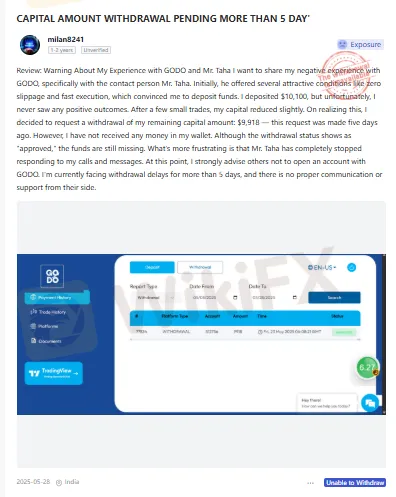
· Long Delays: One of the most common complaints involves severe delays. A user reported that a withdrawal request for nearly $10,000 remained pending for more than five days, even though their client portal showed it as “approved.”
· No Communication: In the same delayed withdrawal report, the trader noted that their contact person at the company became completely unresponsive, stopping all replies to calls and messages after the withdrawal request was made.
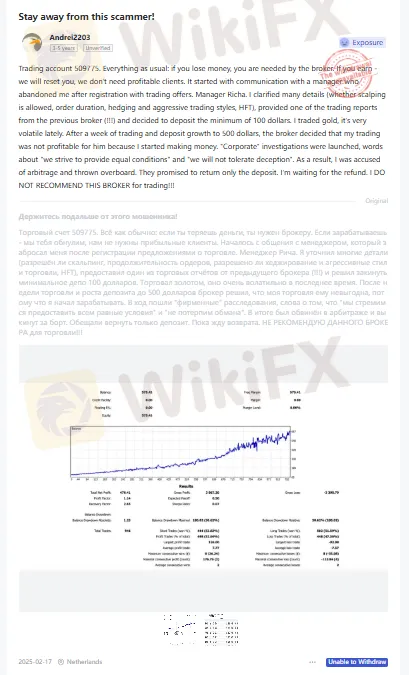
· Disputes Over Profits: Another trader documented a serious dispute. After a week of profitable trading that grew from a $100 deposit to $500, their account was allegedly put under investigation for “arbitrage.” The broker reportedly refused to pay out the profits, agreeing only to return the initial deposit.
Trader experiences can vary widely. To see the most current feedback and problem reports from other users, it's wise to check an independent review site. You can find a dedicated section for user reviews and problem claims on the GODO page on WikiFX.
How to Request a Withdrawal
To request a withdrawal, follow these basic steps. Following these procedures can help minimize potential problems.
1. Make Sure You're Verified: Your account must be fully verified (KYC/AML checks completed) before any withdrawal can be processed. This is a standard requirement for all regulated brokers to prevent money laundering.
2. Login and Navigate: Access the client portal and find the 'Withdrawal' section.
3. Select Method & Amount: Choose your withdrawal method and enter the amount you want to withdraw. Note that many brokers require withdrawals to be sent back to the original funding source.
4. Submit Request: Carefully review the details and submit your withdrawal request.
5. Track Status: Monitor the status of your request in the client portal and check your email for any communications or requests for additional information from the broker's finance department.
What Affects Transaction Times
Understanding what influences deposit and withdrawal speeds can help you manage your transactions better. These factors apply to the entire brokerage industry and are not specific to GODO alone.
Account Verification (KYC)
Know Your Customer (KYC) is a required identity verification process for all regulated financial companies. The most common reason for withdrawal delays is an incomplete or unverified account. Delays often happen if your submitted identity or address documents are unclear, expired, or don't match the information on your account. To prevent this, make sure your account is fully verified well before you plan to make your first GODO withdrawal.
Payment Method Choice
The payment system you choose directly impacts transaction speed.
· E-Wallets & Crypto: Methods like Skrill, Neteller, and USDT are generally the fastest for both deposits and withdrawals. They work outside of traditional banking hours and settlement systems, often allowing for near-instant transfers once the broker approves them.
· Credit/Debit Cards: Deposits via card are typically instant. However, withdrawals are processed as refunds back to the card. This process must go through the card network (Visa, Mastercard) and can take 3-5 business days to show up in your account.
· Bank Wires: This is traditionally the slowest method for both funding and withdrawing. International wire transfers must pass through multiple banks and compliance checks, which can extend the processing time to several business days or even longer.
Internal Processing Times
This refers to the time it takes for a broker's internal finance department to review and approve a withdrawal request before sending the funds. This is a critical factor that is entirely at the broker's discretion. As seen in the user reports for GODO, this internal timeframe can be the biggest source of variation, ranging from under an hour to over a week. A broker's internal policies and staffing for its payments team directly control this speed.
Conclusion: The Full Picture
The GODO funding process presents a mixed picture. On one hand, the broker offers a modern and accessible range of deposit methods, including low entry points for its Cents account, which appeals to new traders. The platform's support for fast payment systems, such as USDT, is also a clear advantage.
On the other hand, the user-reported GODO withdrawal experience is deeply divided. While some traders praise the broker for instant and smooth processing, others have documented significant delays, communication breakdowns, and serious disputes over profits. This stark contrast shows why you absolutely must do thorough research before committing funds. A broker's payment processing efficiency and integrity are cornerstones of their reliability.
Before depositing funds with any broker, including GODO, we strongly recommend you do your own independent research. Check the brokers' latest regulatory status, and, most importantly, read recent, unfiltered user reviews and complaints on a trusted third-party platform. A comprehensive profile, including user-submitted problem reports for GODO, is available for review on WikiFX.
News - Download our new WikiFX app with improved features and updates. Scan the QR code below to get started.